
Friend
Friends System
I have already mentioned in one of the paragraphs something about this 'magic' window. It appeared in MuOnline quite recently and very quickly gained adoration among players. Its main purpose is to make it easier for players to communicate, of course it also has other uses, such as checking the player's status and the current server they are playing on, sending messages or the titular adding of friends to the list.
Friends List - Home Screen
The screenshot below shows the main screen - in the center is my personal list of friends, with whom I can communicate at any time, of course if they are currently playing. If they are not in the game, the Current Location column shows Offline.
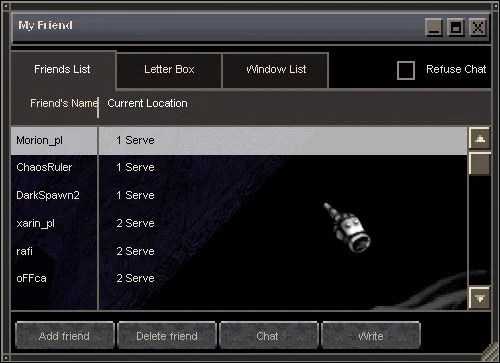
Below the main element, Friends List described in the previous paragraph, there are four buttons, these are - Add Friend, Delete Friend, Chat and Write. Add Friend is a very important option - it is used to add new players to the list. To make your life easier and not waste time pointlessly, just go to the command line, click on Add Friend, and then on the future buddy with the right mouse button. Delete Friend is located next to it to remove old, unnecessary contacts. Chat is a rather unnecessary button, because all you have to do is double-click on the nickname and the same window opens, while Write is much more useful, because instead of entering the character's nickname several times, you just have to select it and click the button once. What is it for? We'll come back to this in a moment. Let's look at the top of the friends list for a second, we can see three tabs, three buttons in the upper right corner (minimize, maximize and close the window) and below a square with the words Refuse Chat. When we do not want anyone to disturb us, we check the box and no unauthorized person will bother us.
Friends List - Letter Box
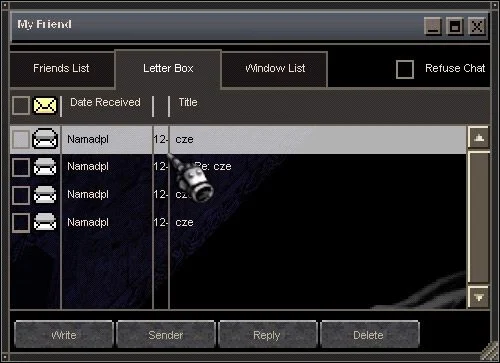
The second tab, Friends List, is Letter Box. As the name suggests, it is used to send e-mails, but these are not exactly normal e-mails received from an Internet mailbox. It is like a small personal mailbox of the program. Unfortunately, as in the real world, we have to pay for sending a letter (of course, we are talking about virtual money, or ZEN), fortunately, it is a really small sum (1000 ZEN). Let's look at the main window, there are letters from my good friend. Let's open one of them:
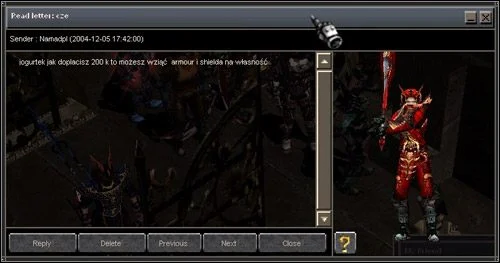
And before our eyes, such a letter panel appears. The bar at the top (Sender) contains the entered nickname of the character, thanks to which we will send a reply to the message to a given person. Now all we have to do is press the Reply button and enter the content of the message. Delete - of course, deletes the message, Previous - one letter down, Next - one letter up and Close, which closes the window of this letter. Observant people will certainly notice the character, which we can freely rotate and view.
Window List and Chat Window:
There is no point in writing about the Window List, because we basically won't find anything interesting there. It contains the nicknames of the characters we are currently talking to - when we close the chat window with one of the people, their nickname disappears from this list. In the case of minimization, the nickname still remains during the active conversation.
Much more important is the chat window. Let's describe it a bit.
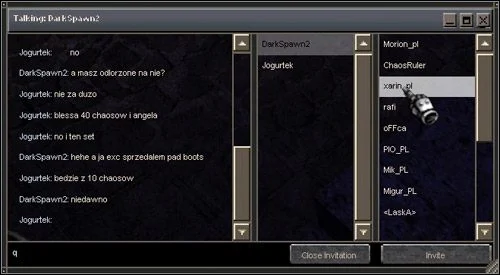
At the very top of the window is the nickname of the character we are currently talking to. Below on the left side we see the chat and at the very bottom - a text line, in which we enter the desired text. Especially for the description, I opened columns with character nicknames that I rarely use, which we can add to the active conversation. We select the character, click Invite and the conversation takes place in a larger group.
 Loading...